
In this edition of the 🧭 Microsoft 365 Compass 🧭 newsletter, we're breaking down the general availability launch of Copilot Cowork and what its biggest updates actually mean for how you work day to day.
Copilot Cowork just went from preview to fully available worldwide, and honestly, this is one of the more significant Copilot releases I've seen this year. It's not a chat feature. It's an agent that goes off and does the work, then comes back with a finished result. If you've been wondering whether Cowork is worth your attention yet, this edition should help you decide.
Worth noting up front: Copilot Cowork now runs on consumption based billing rather than a flat license fee, so usage is billed per task run instead of a fixed monthly cost. That's a real shift in how you'll need to budget and forecast for it. More to come on this in a standalone issue soon.
Event-Triggered Tasks Change the Starting Point
Up until now, most Copilot work started with you typing a prompt. Cowork now flips that. You can set it up to watch for a keyword, an @mention, or a specific event in Teams, Outlook, or a meeting, and it kicks off automatically. Someone mentions a contract renewal in a Teams channel, and Cowork drafts the summary before you've even opened the thread.
Note: this still runs under your permissions and whatever autonomy level you configure, so it's not acting outside what you've allowed. But it's a meaningful shift in when the work starts. You're no longer the trigger. The event is. You can learn more here.
Browser Automation Is Now Generally Available
Cowork can now operate inside a signed-in Edge browser to interact with tools outside Microsoft 365. Think checking a ticket status in a portal that doesn't have a Microsoft connector, or pulling invoice data from a vendor site. In practice, this closes a gap a lot of us have felt: not everything we touch in a day lives inside M365. Note: this has to be enabled by your Microsoft Administrators.
A Real Multi-Model Lineup
This is the one that caught my eye. Cowork now routes tasks across OpenAI's GPT-5.6, Anthropic's Claude Opus models, and a new Cowork 1 model built specifically for this experience. You can let it choose automatically or pick manually.
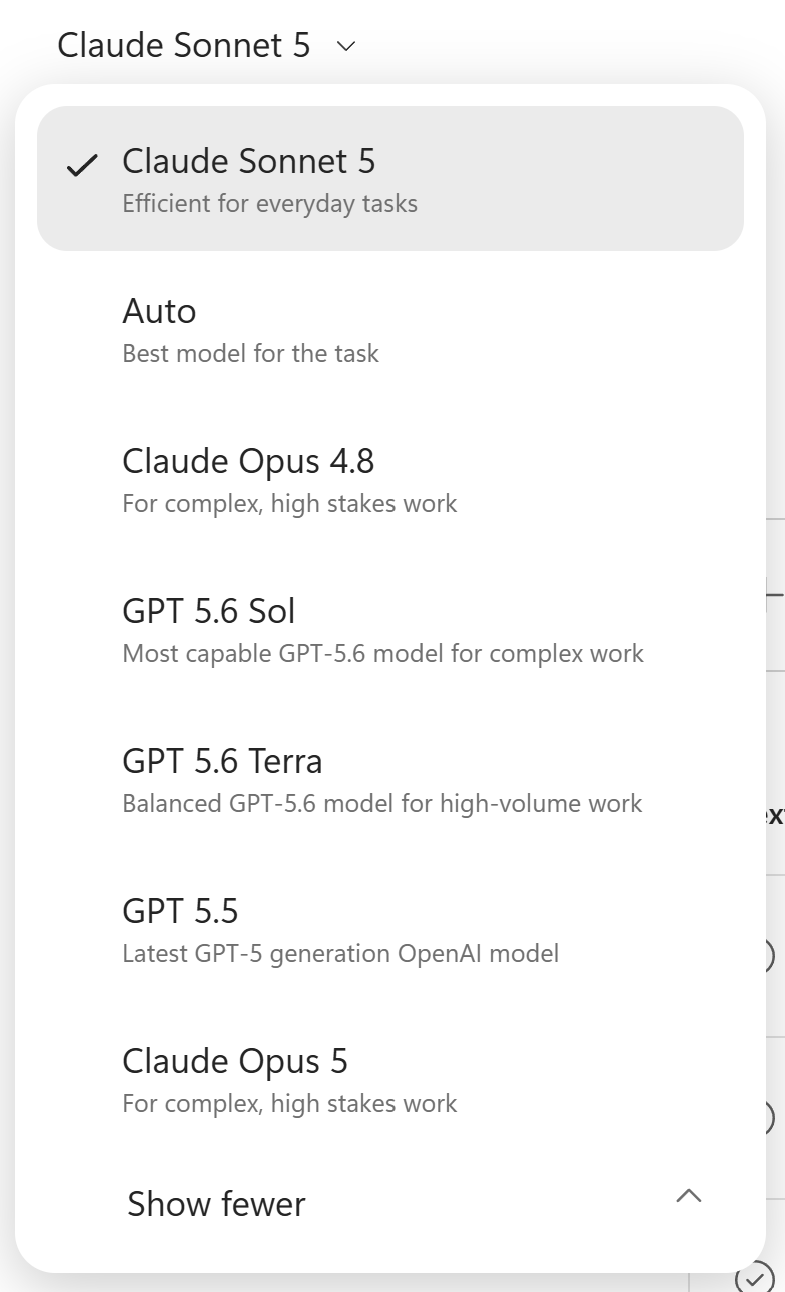
I appreciate that Microsoft isn't locking this down to a single vendor. Different models are genuinely better at different tasks, and giving Cowork the ability to route intelligently (or let you override it) is a practical acknowledgment of that instead of a marketing story.
Presentations and Images Got Smarter Too
Cowork now uses your official PowerPoint templates and asset libraries automatically, so decks it builds actually look like they belong to your organization. It can also generate or edit images with ChatGPT Images 2.0, which is a nice touch if you've ever needed a quick visual and didn't want to leave the flow of your work to go find one.
🧠 Final Thoughts
What stands out most to me isn't any single feature here, it's that Cowork is behaving less like a chatbot and more like a coworker you can actually hand something to and walk away from. The event triggers and multi-model routing both point toward the same idea: less time spent prompting, more time spent reviewing finished work.
I'd also love your input:
👉 Is there one of these features you'd want a full deep dive on? Reply and let me know.
👉 If your organization has rolled out Cowork already, how did you handle the shift to consumption based billing? I'm curious how teams are budgeting for something billed per task run instead of a flat license.
👉 If Cowork could watch for one keyword or event in your day and act on it automatically, what would you set it to?
As always, just hit reply, I read every message!
Hiring Globally, Made Simple with Deel
If your role has ever expanded into hiring or managing contractors and employees outside your home country (and for a lot of us in the M365 and IT space, remote and global teams are becoming the norm), Deel is worth knowing about. It's a payroll and compliance platform that handles contracts, tax forms, and payments across 150+ countries, so you're not chasing down local labor law or wiring money manually. They also offer Employer of Record services if you want to hire full-time talent abroad without setting up a legal entity yourself.
I've used Deel myself and it's genuinely proven useful, it takes a process that used to feel like a headache and makes it painless.
Check it out below and submit the contact form. A Deel rep will reach out to set up a scoping call and explore how Deel might be able to help.
Enjoyed This Content?
If you found this content helpful, consider showing your support by Buying Me a Coffee. Your generosity helps cover the costs of the tools and services I use to create valuable content and keep it coming your way. Thank you for your support!
Got Questions or Ideas? Let's Connect!
Are you facing a challenge with a Microsoft 365 app? Have a tutorial idea you'd like to see covered? Or perhaps you're looking for personalized coaching and guidance to make the most of Microsoft 365? If so, just hit the reply button and get in touch—I’d love to hear from you! Your feedback and ideas help shape the content I create, ensuring it’s tailored to your needs. Let's work together to boost your productivity and tech skills!
Looking for a Previous Tip? 🔎
Did you know? You can quickly find all past editions of the 🧭Microsoft 365 Compass🧭 newsletter in one place! Just visit this section on my website — no need to dig through your inbox. Catch up on tips, tricks, and tutorials anytime! 🚀


Responses