
In this edition of the 🧭 Microsoft 365 Compass 🧭 newsletter, we're exploring a new Copilot in SharePoint feature that makes comparing document versions fast and genuinely useful.
If you've ever manually compared two versions of a document in SharePoint, you know the drill: open version history, pull up the older file, scan line by line for what changed. It works, but it's slow and error-prone.
Copilot in SharePoint now handles this automatically. Ask it to compare versions of any document and get a clear breakdown of what changed, when, and why it matters.
Note: This feature requires a Microsoft 365 Copilot license and works with files stored in SharePoint document libraries.
What the Copilot Compare Versions Feature Does
When you ask Copilot to compare versions of a document, it compares the last two major versions and summarizes the key differences. This isn't a simple diff tool that just highlights changed text — Copilot reads the document intelligently and explains the changes in plain language. That distinction matters: instead of hunting through tracked changes or color-coded markup, you get a clear, readable summary you can act on.
How to the Copilot Compare Versions Feature
The steps to use the Copilot compare versions feature are straightforward:
- Open your SharePoint document library
- Select the file you want to review
- Click the floating Copilot icon
- Choose Compare versions
Copilot will generate the comparison directly in a new popup panel. You can even follow up with questions if anything needs clarifying.
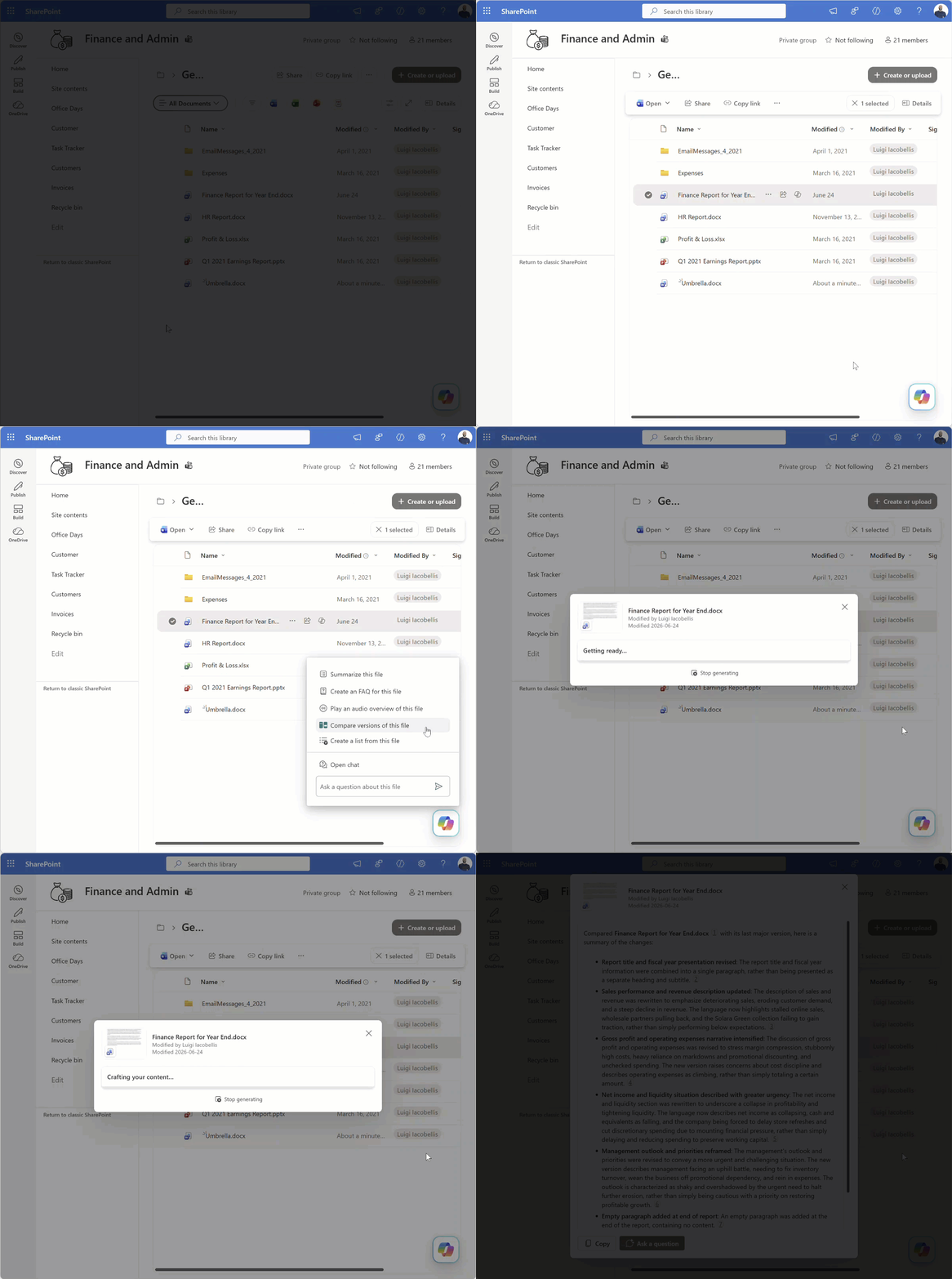
In the example above, Copilot is comparing the last two major versions of a document containing a fictional summary of year-end financial performance for a company. The first version describes a generally positive scenario, whereas the second presents a much more negative one.
Still Typing Reports By Hand?
If you've got Copilot sitting in your Microsoft 365 apps and haven't quite figured out how to make it part of your actual week, I built something for exactly that gap.
Copilot Cowork Essentials is a short email course, eight emails, each one built around a single practical win. Meeting transcripts that summarize themselves. Recurring reports drafted in 90 seconds instead of an hour. Inbox triage that doesn't cost you your voice. Nothing theoretical, just the workflows I actually use.
It's not about learning everything Copilot can do. It's about getting the handful of things it does well folded into your Tuesday, so it stops being a tab you forgot about and starts being time back in your week.
Start saving yourself hours per week 👇
What This Means in Practice
Think of this as Copilot doing the audit work for you. In environments where documents go through multiple rounds of review, stakeholder feedback, and approvals, version tracking tends to be messy. People rename files, save over drafts, or forget to leave comments explaining what they changed.
The Compare versions feature gives you a way to reconstruct that history without relying on people to document their own edits. For compliance-heavy teams, project managers, or anyone who deals with living documents that evolve over time, this is a tangible time saver.
🧠 Final Thoughts
Version comparison should have existed long before AI, and in a basic form it did; it just wasn't useful at scale. Copilot turns a manual, error-prone exercise into something you can complete in seconds. I'm especially glad to see the summary output, because that's what actually moves you from "I checked the document" to "I can explain what changed to a stakeholder."
I'd love to know how this lands for your team!
As always, just hit reply — I read every message!
Enjoyed This Content?
If you found this content helpful, consider showing your support by Buying Me a Coffee. Your generosity helps cover the costs of the tools and services I use to create valuable content and keep it coming your way. Thank you for your support!
Got Questions or Ideas? Let's Connect!
Are you facing a challenge with a Microsoft 365 app? Have a tutorial idea you'd like to see covered? Or perhaps you're looking for personalized coaching and guidance to make the most of Microsoft 365? If so, just hit the reply button and get in touch—I’d love to hear from you! Your feedback and ideas help shape the content I create, ensuring it’s tailored to your needs. Let's work together to boost your productivity and tech skills!
Looking for a Previous Tip? 🔎
Did you know? You can quickly find all past editions of the 🧭Microsoft 365 Compass🧭 newsletter in one place! Just visit this section on my website — no need to dig through your inbox. Catch up on tips, tricks, and tutorials anytime! 🚀


Responses